How to avoid double bookings on Airbnb, Booking.com, Agoda and Trip.com
Why the same room gets booked twice when you sell on several platforms, why iCal calendar sync is not enough, and a checklist to stop it.

Selling the same villa or room on Airbnb, Booking.com, Agoda and Trip.com fills more nights. It also opens the door to the most expensive mistake in hospitality: two guests arriving for the same room on the same night. This guide explains why it happens and what actually prevents it.
Why double bookings happen
Every platform keeps its own calendar. When a guest books a night on Booking.com, the other platforms (Airbnb, Agoda, Trip.com) only find out if something tells them. Double bookings happen in the gap between the booking and the moment the other calendars close that night.
Common causes:
- Calendars synced with iCal links, which only refresh every few hours.
- Walk-in, phone, WhatsApp or repeat-guest bookings written in a notebook but never closed on the platforms.
- A cancellation or date change on one platform that is not copied to the others.
- Rooms closed for maintenance or an owner's stay on one platform but not on the rest.
- Identical rooms sold as one room type on one platform and as separate listings on another.
Why iCal sync is not enough
iCal is the free calendar link most platforms offer: you paste one platform's export link into another platform's import setting. It is better than nothing, but it has limits:
- It is slow. Imported calendars refresh every few hours, not when the booking happens. A popular night can sell twice in that window.
- It only blocks dates. No prices, no guest names, no booking details. Rates still have to be changed on every platform by hand.
- It multiplies. Three platforms and ten rooms means dozens of links to set up and keep working. One broken link is enough.
- It is one listing to one listing. It cannot say "two of my five standard rooms are still free".
- Cancellations are slow too. After a guest cancels, the nights can stay closed elsewhere for hours, and you lose the sale.
What a channel manager does differently
A channel manager connects to each platform through the platform's official connection (API) instead of a calendar link. When a room is booked anywhere, the other platforms close it within seconds or minutes, not hours. It works both ways: platform bookings come in automatically, and rates and availability go out from one place. Booking.com, Airbnb, Agoda, Expedia and Trip.com all work with certified channel managers.

If you sell on more than one platform, this is the most reliable way to stop double bookings.
A checklist to stop double bookings
- Keep one master calendar. Every booking from every platform, and every walk-in, lands in one place. That calendar is the truth; the platforms follow it.
- Enter offline bookings straight away. Phone, WhatsApp and walk-in guests are the most common cause. Enter the booking while the guest is still on the phone, not at the end of the day.
- Use a channel manager once you sell on two or more platforms. If you stay with iCal for now, import every platform into every other one and check the "last synced" time often.
- Close rooms in one place. Maintenance, owner stays and long-term guests go into the master calendar, which closes them everywhere.
- Mind Airbnb's preparation time. If Airbnb blocks a night before or after each stay, the other platforms cannot see those blocks unless your system knows about them.
- Enter existing bookings before you connect anything. When you switch to a channel manager, enter your future bookings first; otherwise rooms already sold look free.
- Have a plan for when it happens. Call the guest at once, offer an equal or better room nearby and cover the difference. Host cancellations are costly: Airbnb may charge a cancellation fee and posts an automatic note on your listing saying you cancelled, and Booking.com expects you to arrange comparable accommodation for the guest.

How BaanHost handles it
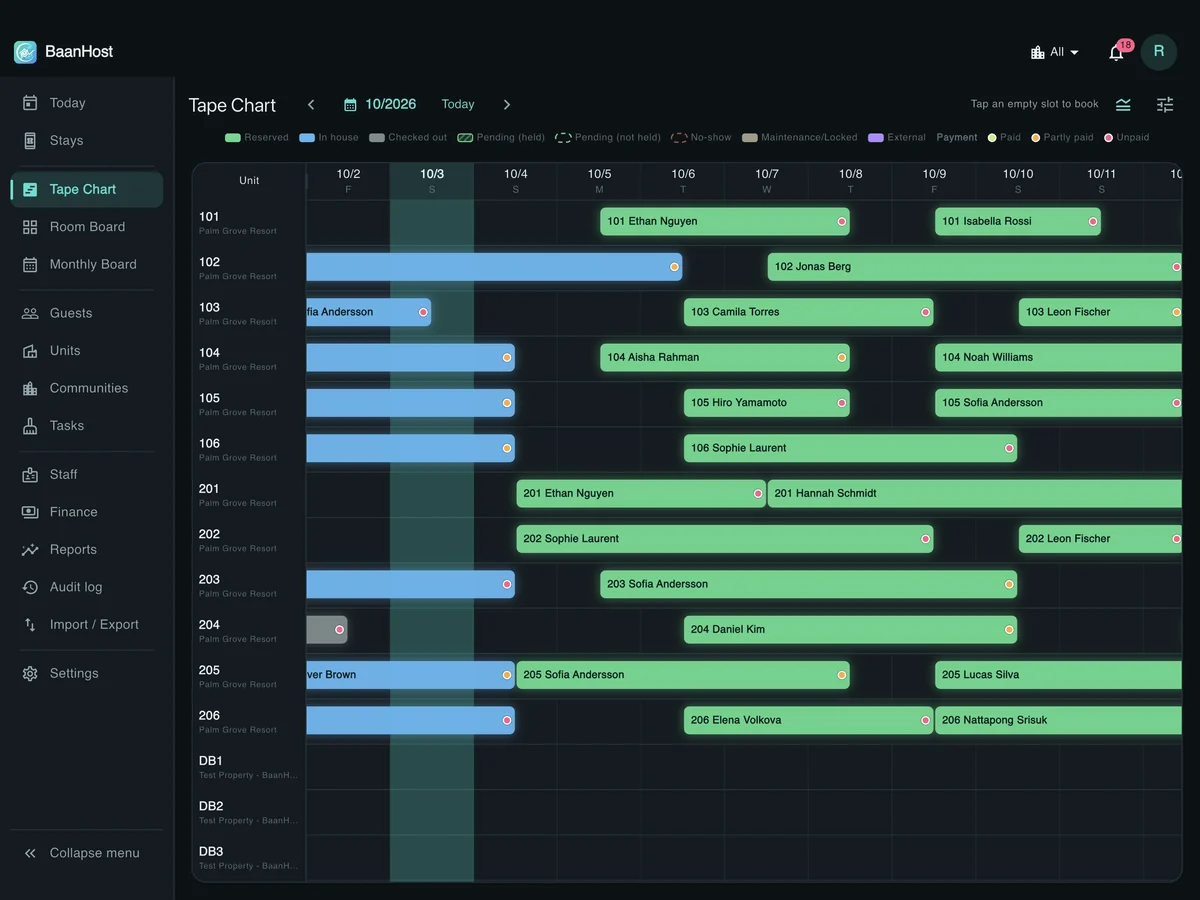
The BaanHost tape chart is your master calendar, and two-way channel sync (through the channel manager Channex) is included in every plan:
- Availability and rates go out to Booking.com, Airbnb, Agoda, Expedia, Trip.com and more than 20 other platforms automatically, and their bookings appear on the tape chart by themselves.
- A walk-in or phone booking entered on the tape chart closes that room on every connected platform.
- When you connect a platform, bookings you already entered are matched to the platform's bookings instead of being duplicated, and the old iCal import for that listing stops by itself.
- Identical rooms can sell as a room type on Booking.com and as single listings on Airbnb at the same time.
- iCal links still work for any platform you don't connect.
Platforms you can connect today: Booking.com, Airbnb, Agoda, Expedia, Trip.com, Traveloka, Tiket.com, Klook, Hostelworld, HotelTonight, Hipcamp, GlampingHub, eDreams, Check24, Mr & Mrs Smith, Tablet Hotels, Feratel, Ostrovok (Emerging Travel Group), DidaTravel, Getaroom, HyperGuest, MG Bedbank and WebBeds, with more on the way.
See Connect Airbnb and Booking.com and Import your existing bookings. Try BaanHost free for 14 days, no card needed.
Tape chart, channel sync with Booking.com, Airbnb, Agoda and Trip.com, guest check-in and finance in one app. No card needed.