
Subscription and plans
Six plans by number of units, every feature and channel sync included, no commission on bookings. Subscribe in the app with the App Store or Google Play.
The 14-day trial
New accounts get 14 days with every feature, channel sync included, and no limit on units. No card is needed.
Six plans
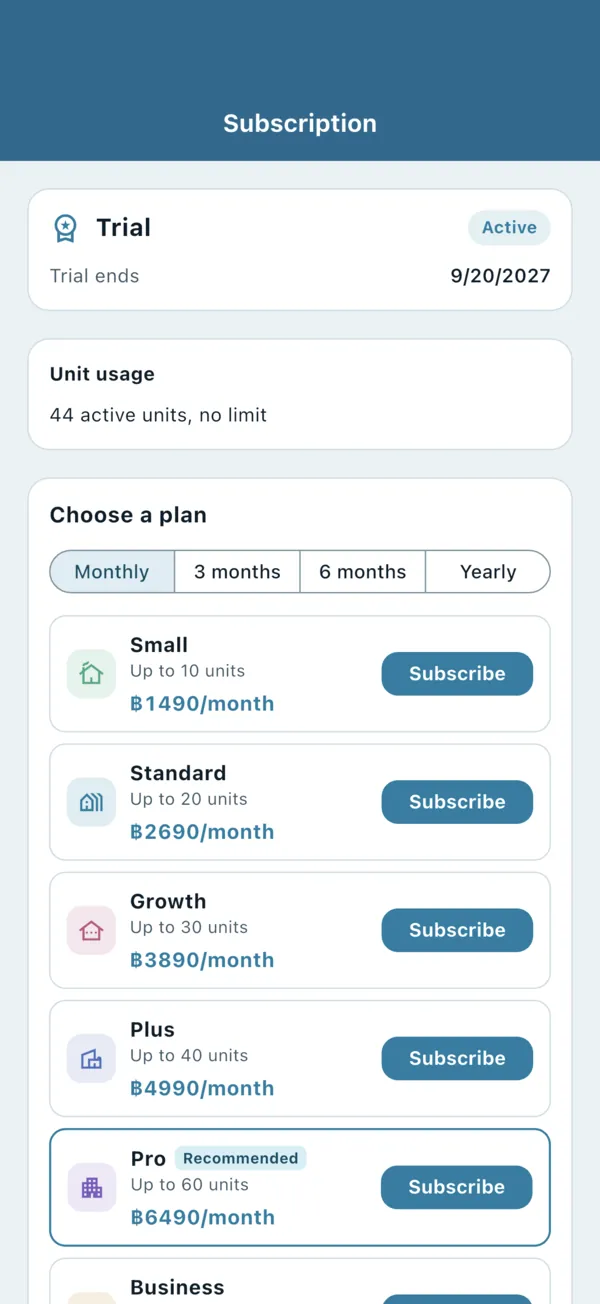
Plans differ only by the number of active units. Every plan includes all features, channel sync and unlimited staff, with no commission on your bookings.
- Small: up to 10 units
- Standard: up to 20 units
- Growth: up to 30 units
- Plus: up to 40 units
- Pro: up to 60 units
- Business: up to 100 units
More than 100 units? Email [email protected]. Current prices are on the BaanHost home page and in the app.
Subscribe in the app
- Open More → Subscription. Only the Owner can subscribe or restore a purchase. Everyone else sees “Please contact the owner” on this page.
- Under Choose a plan, choose the period: Monthly, 3 months, 6 months or Yearly. Longer periods cost less per month; not every plan is offered for every period.
- Tap Subscribe on the plan and pay with your Apple ID or Google Play account.
- Subscribing during the trial does not waste it: the remaining trial days are added after the paid period.
- One subscription covers the whole organization and every device and staff member.
- Bigger plan: it starts straight away. Smaller plan or other period: it starts when the current period ends.
- New phone? Tap Restore purchases. To cancel or change payment details, tap Manage subscription.
Several owners: who can change the plan
App Store and Google Play subscriptions remember who bought them. If your organization has several Owners:
- Only the person who bought the subscription can change or renew it, on their own device. On a new phone signed in to the same Apple ID or Google account, they can carry on as before.
- Other owners see on Subscription who bought it, and the buy and change-plan buttons are greyed out. Restore purchases still works. Buying again on another device would start a second subscription and charge every period twice.
- If two people each bought one, every owner gets a push notification and the bell shows “Duplicate subscription detected — cancel the extra one in the store”. To cancel it: on iPhone, Settings → Apple ID → Subscriptions; on Android, Play Store → Payments & subscriptions → Subscriptions. The notice disappears once it is cancelled.
- If the buyer’s account is deactivated or deleted, the restriction is lifted and other owners can subscribe on their own devices.
Paying for more than one organization
- Apple allows only one BaanHost subscription per Apple ID at a time. If an Apple ID already pays for one organization, buying for another one would change the first organization’s plan instead. To pay for a second organization, use a different Apple ID; the app notices this before you buy and tells you.
- A Google account can’t subscribe to the same plan for two organizations at once: use a different Google account, or choose another plan for the second one.
- To move between organizations, see Staff, roles and permissions.
Counting units
Only active units count, across all your communities. If you have more active units than the plan allows, switch off units you no longer rent out (see Communities, units and Excel import) or choose a bigger plan.
When the trial or subscription ends
- Trial ended: the account becomes read-only straight away.
- Paid plan not renewed: you get 7 days' grace, then the account becomes read-only. A cancelled renewal becomes read-only at the end of the paid period.
- Read-only: you can see and export everything, but not change anything. Channel sync is disconnected at the end of that month (see Connect Airbnb and Booking.com).
- Subscribe again and everything is writable at once. Data of accounts that stay read-only is kept for 90 days.